
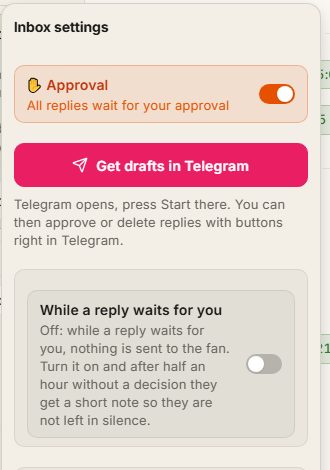
What to press
- Dialogs → the switch at the top: Approval or Auto. The same setting is in ⚙ Inbox settings → Approval.
- To get drafts in Telegram, press Get drafts in Telegram in the same settings (shown while approval is on).
- In Telegram each draft comes with buttons: Approve & send, Delete, Write my own reply, Open on site.
Good to know
- Write my own reply: you type in your own language, the fan gets a translation. Before sending you see it with Send as is, Rewrite and Cancel.
- A draft nobody approves is never sent. A regular draft is cancelled after 24 hours; a paid offer waits until a fresh draft replaces it.
- While a reply waits for you: Lola can send the fan a short note that you'll reply soon. It goes after half an hour of waiting, at most once a day per chat, only if the fan wrote last and nobody replied by hand. You can write your own text (3 to 280 characters, no links).
- On older accounts this note is off by default; it is turned on in the same settings.
- The owner and the supervisor can switch the mode.
New look: In the new look: Dialogs → How Lola replies.
Still stuck? Write to our team: the chat button in your dashboard, the Support page or Telegram @ManyFansAi.Open SupportTelegram support @ManyFansAi →