
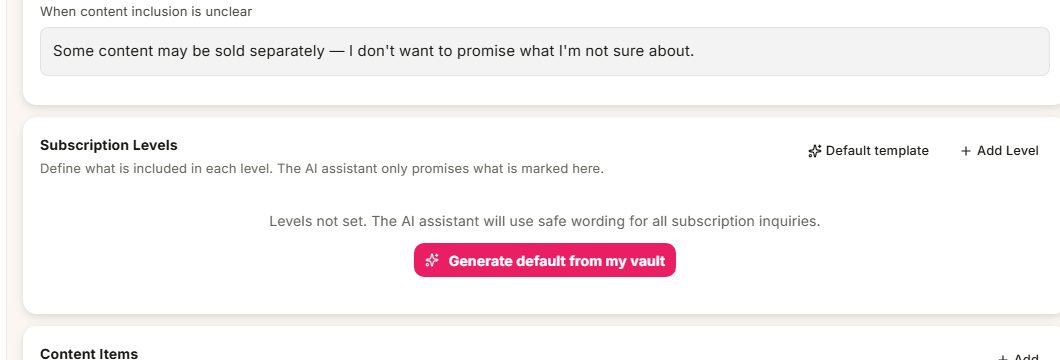
What to press
- Open AI rules in the menu.
- If the model has levels on Fansly, press Take from Fansly: they appear in the list with the name and price from Fansly. For your own levels press Add Level or Default template (three ready levels; the template replaces your own levels, Fansly levels stay, the page asks first).
- For each level pick What the subscription includes: files up to which level (L0-L7) a fan on it already has. A price limit is optional. Press Save: until then nothing is stored.
- Fansly levels don't need to be given to fans: right after Save the level is set for its subscribers we already know about, and every few hours we check on Fansly who is on which level and mark it ourselves. Your own level for a fan: Clients → open the fan → Subscription → pick the level → Save.
Good to know
- A fan gets a Fansly level only after you have taken that level here, chosen what it includes and saved. If you remove the level from the rules, it is removed from fans right away. When the subscription ends, the level is removed at the next check. A level you set for a fan by hand we don't touch.
- The fan card in Clients shows the fan's Fansly subscription and until when it runs, even before you take that level here.
- The default template knows what each level includes: Soft, photos up to L2 (videos are not included); Full, up to L4; Premium, up to L6. A level without What the subscription includes has no rule, so Lola sells to that fan as usual.
- A file counts as included when its level is within the level's What the subscription includes and, if a price limit is set, its price is within it: Lola doesn't sell such a file to that fan. A level guessed from the folder name doesn't count for this. Files above the fan's level Lola sells as paid extras and may mention them as a reason to move up a level.
- This check works when Lola picks a single file. Sets and story steps don't check the fan's level.
New look: In the new look: More → AI rules. Fansly subscription tiers are already listed with the number of subscribers, nothing to take: open a tier, pick Up to L and press Save. Stop counting this tier removes it from fans. An agency can set the same for the first tier of other models with Same for other models. The level and the Fansly subscription are in the fan card under Subscription level; if that tier isn't counted yet, the card has Set up in AI rules.
Still stuck? Write to our team: the chat button in your dashboard, the Support page or Telegram @ManyFansAi.Open SupportTelegram support @ManyFansAi →