
What to press
- In Content, open the folder menu (the three dots on the folder card, or right-click) and choose Sales settings.
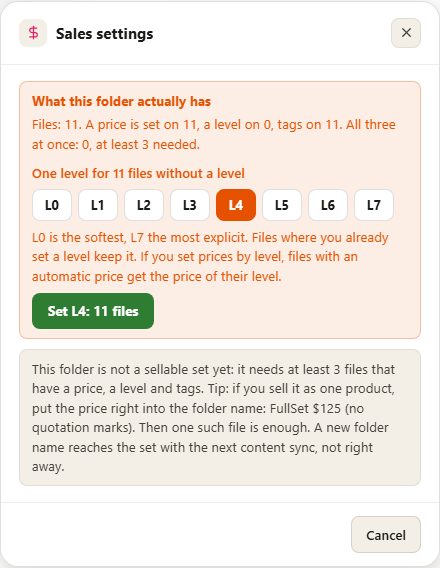
- If the folder is not a set yet, the window shows what it has: files, prices, levels, tags.
- Files without a level? Pick a level (L0 to L7) right in the window and press Set. Files where you already set a level keep it.
- Press Start selling now. The set is created and Lola can offer it right away.
- Mode: Only pack. How the set is priced: One price for the whole set. Price for the whole pack $: your price. Press Save.
Good to know
- Any Save in the window fixes the price in the field as yours, even if you didn't change it. Saving with the field empty removes that, and within half an hour the site fills the price in again.
- A file without tags does not go into a set. To tag many files at once: open the folder, Select, Tags.
- A file at $0 is not part of a paid set.
- If you set prices by level, a file with an automatic price gets the price of its level once it has one.
- Put the price into the folder name, like FullSet $125: then the folder becomes a set with just one ready file (with a price, a level and tags). The price from the name fills in the set price field (rounded to the dollar) until you press Save: after that a new price in the name no longer changes the field. A new folder name reaches the set with the next content sync, not right away.
- Lola can send the set even to a fan who hasn't bought anything yet.
- If How Lola sells your content in Model is set to Stories only, Lola sells no sets and no single files, only stories.
New look: In the new look: Content → Shelf → All actions → three dots on the folder → Sales settings.
Still stuck? Write to our team: the chat button in your dashboard, the Support page or Telegram @ManyFansAi.Open SupportTelegram support @ManyFansAi →