
What to press
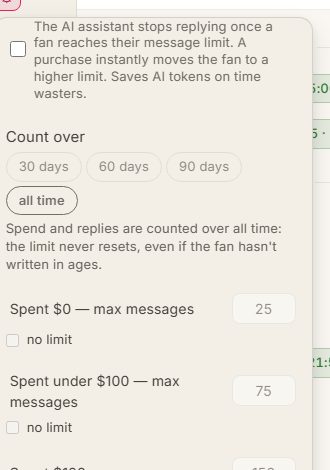
- Turn on Limit AI messages by fan spend.
- Set the max number of messages for each level: Spent $0, Spent under $100, Spent $100+. Or tick no limit.
- Count over: 30, 60 or 90 days, or all time.
Good to know
- Off by default. Defaults when on: 25, 75 and 150 messages.
- With Count over 30, 60 or 90 days only Lola's messages count. With all time the messages you send from Dialogs count too (what you write straight on Fansly doesn't).
- When a fan reaches the limit, Lola simply doesn't reply: nothing is sent and no reply is used up. You can still reply yourself. A purchase moves the fan to the next level right away.
- 0 means Lola never replies to that level.
- If a fan who has paid gets blocked by the limit, you get a notice in the bell.
- Only the owner and the supervisor can change it.
New look: In the new look: Dialogs → How Lola replies → Time wasters.
Still stuck? Write to our team: the chat button in your dashboard, the Support page or Telegram @ManyFansAi.Open SupportTelegram support @ManyFansAi →